jma_URLs_comp = {
    'wakkanai': 'https://www.data.jma.go.jp/stats/etrn/view/10min_s1.php?prec_no=11&block_no=47401&year=2024&month=3&day=9&view=',
    'abashiri': 'https://www.data.jma.go.jp/stats/etrn/view/10min_s1.php?prec_no=17&block_no=47409&year=2024&month=3&day=9&view=',
    'akan': 'https://www.data.jma.go.jp/stats/etrn/view/10min_a1.php?prec_no=19&block_no=0096&year=2024&month=3&day=9&view=',
    'tokyo': 'https://www.data.jma.go.jp/stats/etrn/view/10min_s1.php?prec_no=44&block_no=47662&year=2024&month=3&day=9&view=',
    'hakone': 'https://www.data.jma.go.jp/stats/etrn/view/10min_a1.php?prec_no=46&block_no=0390&year=2024&month=3&day=9&view=',
    'nakatane': 'https://www.data.jma.go.jp/stats/etrn/view/10min_a1.php?prec_no=88&block_no=0897&year=2024&month=3&day=9&view=',
}Algorithmic Site Crawling for Automatic Discovery of URL Identifiers of Japan’s Weather Stations
(A) Data Collection
(B) Data Preprocessing
weather data
Japan Meteorological Agency
data scraping
data parsing
library - re
library - requests
library - bs4
library - time
library - json
library - pathlib
Algorithmically crawling a website to automatically discover the URLs to scrape data from can eliminate the error prone process of copying and pasting the desired URLs. Follow along this tutorial to find out how I discovered the unique URL identifiers for each weather station in Japan with algorithmic site crawling, by specifying just one starting URL on the Japan Meteorological Agency (JMA) website.

1 Introduction
When web scraping data of the same format from multiple pages on one website, the URL addresses are often quite similar. Experienced coders leverage this similarity to make a template URL, and vary the components that change from web page to web page, enabling automation of the data scraping process.
Such was the case when I was scraping weather data from the Japan Meteorological Agency (JMA). The URLs containing weather data from over 1500 AMeDAS weather stations could be generated by knowing three identifiers of the JMA station:
prec_noblock_no- whether the station is an
soratype
The best part was that retrieval of this information could be done automatically for all 1500+ weather stations, with just one user specified URL input. In other words, I could algorithmically crawl the JMA website from a strategic starting point, and discover the URL identifiers for each weather station.
In this tutorial, I will show you how I scraped the HTML from the JMA website using requests.get(), generated subsequent URLs showing the regional maps to send subsequent requests, parsed the three station identifer data using Beautiful Soup and regular expressions, organized the information into a nested dictionary, and saved the information as a JSON file. If you are in a similar situation where you need to automate the process of finding the URLs to scrape data from, you may find the following information useful.
1.1 What You’ll Learn in This Tutorial
By the end of this tutorial, you’ll learn how to:
- Scrape URL links from JMA’s map interface using
requestslibrary - Parse the URL from the raw data with
Beautiful Souplibrary - Use regular expressions (regex) to extract unique identifiers from the HTML associated with each weather station and store them as nested dictionaries
- Save the dictionary as a JSON file
If you prefer to skip the explanations and jump straight to the implementation, you can download the code from my GitHub repository.
Here is the list of things you’ll need to run the code.
1.2 Prerequisites
- A copy of either the
algorithmic-site-crawling-url-discovery.ipynbJupyter notebook oralgorithmic-site-crawling-url-discovery.pyPython script from my GitHub repository data/subfolder for saving the JSON output- Python libraries
rerequestsbs4timepathlibjson
1.3 Jargon
Web crawling: The automated process of bots or software programs systematically browsing and indexing web pages.
Data scraping: Using code to extract information from a web page or a source that’s primarily designed for human viewing. In this blog post, we’ll be pulling data from the href and onmouseover attributes associated with the <areas> tag of the web HTML.
Data parsing: Converting raw or unstructured text into something structured and easy to work with. For example, extracting three unique identifiers, useful for generating URLs specific to individual weather stations, from the raw HTML.
Regular expression: Matching of text or string patterns against some template. By specifying the expected pattern of strings, parts of the text or substrings can be extracted.
2 What are the Unique Identifiers in the URL?
Before diving into the actual algorithmic site crawling to extract the unique identifiers for each JMA weather station, let us figure out what exactly we want to extract. In other words, what makes the URL of each weather station unique? What parts do not change between URLs of different stations, and what parts differ?
Below is a dictionary containing the complete URLs for the 10-minute interval meteorological data on March 9, 2024 from six weather stations located in Japan. I’ve picked out both large and small weather stations from the northern and southern parts to ensure we have a relatively good mix.
To make it easier to spot the differences in the URLs, I’ll color the differences in red, green and blue, as detected with regular expressions:
# Import library for regular expressions
import re
# The template of the URL
re_URL = r'https://www.data.jma.go.jp/stats/etrn/view/10min_([as])1.php\?prec_no=(\d+)&block_no=(\d+)&year=2024&month=3&day=9&view='
# Work through each URL
for key, value in jma_URLs_comp.items():
# Find the part that matches the template URL
URL_match = re.search(re_URL, value)
# The regex extracts three sections that differ in the URL. Print them out with different colors
print(f"{key.capitalize():<12}", end='')
print('data.jma.go.jp/stats/etrn/view/10min_', end="")
print(f"\033[1;31m{URL_match.string[URL_match.start(1):URL_match.end(1)]}\033[0m", end="")
print('1.php?prec_no=', end="")
print(f"\033[1;32m{URL_match.string[URL_match.start(2):URL_match.end(2)]}\033[0m", end="")
print('&block_no=', end="")
print(f"\033[1;34m{URL_match.string[URL_match.start(3):URL_match.end(3)]}\033[0m", end="")
print('&year=2024&month=3&day=9&view=')Wakkanai data.jma.go.jp/stats/etrn/view/10min_s1.php?prec_no=11&block_no=47401&year=2024&month=3&day=9&view= Abashiri data.jma.go.jp/stats/etrn/view/10min_s1.php?prec_no=17&block_no=47409&year=2024&month=3&day=9&view= Akan data.jma.go.jp/stats/etrn/view/10min_a1.php?prec_no=19&block_no=0096&year=2024&month=3&day=9&view= Tokyo data.jma.go.jp/stats/etrn/view/10min_s1.php?prec_no=44&block_no=47662&year=2024&month=3&day=9&view= Hakone data.jma.go.jp/stats/etrn/view/10min_a1.php?prec_no=46&block_no=0390&year=2024&month=3&day=9&view= Nakatane data.jma.go.jp/stats/etrn/view/10min_a1.php?prec_no=88&block_no=0897&year=2024&month=3&day=9&view=
Thus, there are three components within the URL that makes it unique to each JMA meteorological station. Knowledge of these three unique identifiers is all that is needed to generate the weather station’s URL when scraping data. Namely,
- Whether the JMA station is an
stype oratype (shown in red) prec_no(shown in green)block_no(shown in blue)
We now know exactly what we want to extract and save.
3 Retrieving the Three Unique Identifiers from One Starting URL
So, our task is to extract the three unique identifiers that designate the URL of over 1500 weather stations. Luckily, the three identifiers can all be ultimately accessed from a common starting point. Namely, JMA’s map interface for accessing past meteorological data of specific stations, as shown in Figure 1.
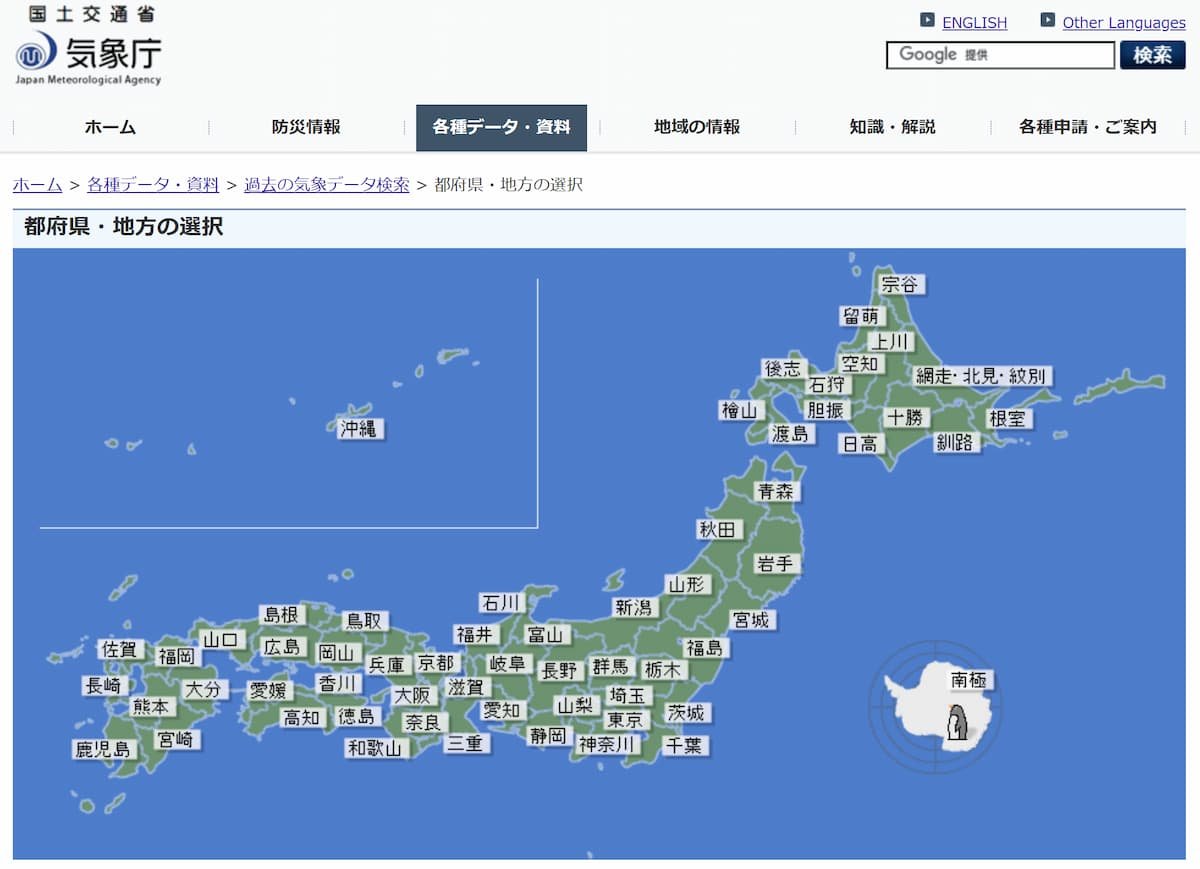
By clicking on one of the area names in Figure 1, the user is directed to a more detailed map of each region, such as the one shown in Figure 2. Each dot on Figure 2 corresponds to a weather station, and the three unique identifiers for each station can be accessed from this smaller regional map.
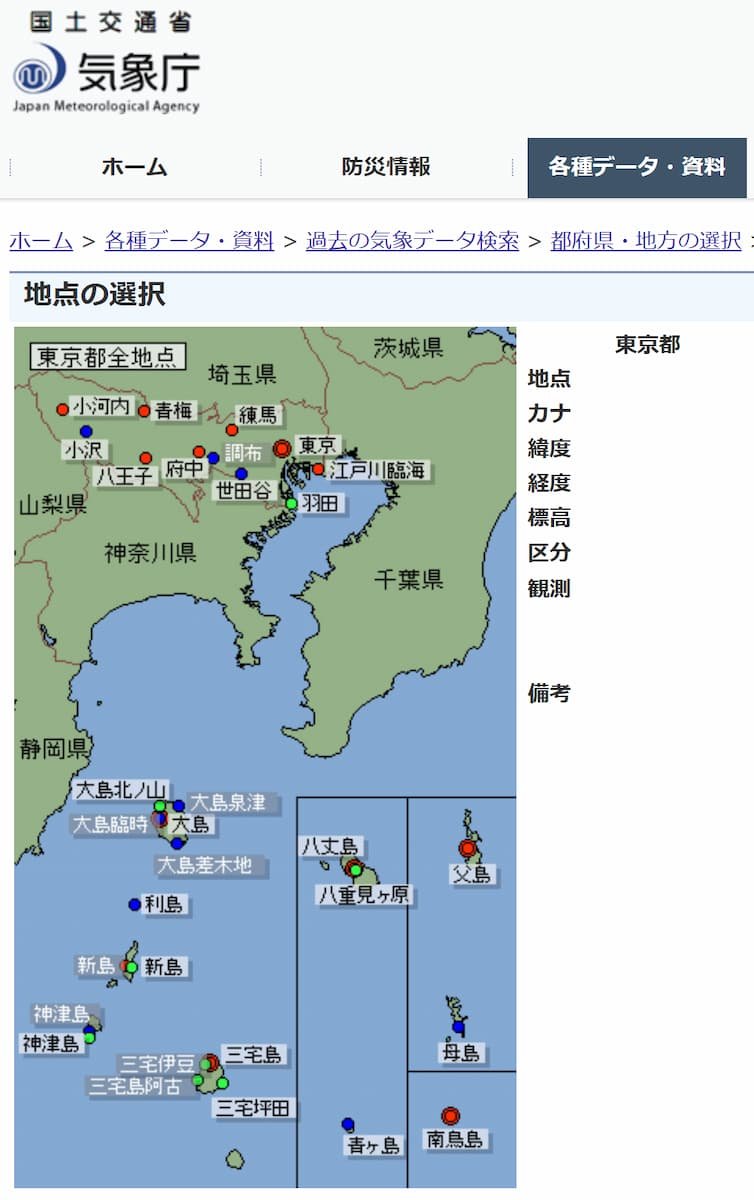
As such, we can algorithmically crawl the starting map interface, search for links inside this web page, and recursively crawl the links to regional maps until we discover the URLs and the unique identifiers associated with the JMA weather stations. The general steps to access the unique identifiers for each weather station are as follows:
- From the starting map interface (Figure 1), scrape all links that lead to a smaller region
- Store the complete URLs of each regional map. Crawl one of the regional map URL.
- Scrape all links on the regional map (Figure 2). Each of these links correspond to a weather station
- Parse the HTML for each weather station and extract the three unique identifiers
- Store the unique identifiers in a nested dictionary
- Repeat for all other weather stations within the regional map (Figure 2)
- Repeat for all other regions within the starting map interface (Figure 1)
By designating just one starting URL, the chance of introducing human error into the code is greatly reduced. If one started at step 2, they’d have to copy and paste URLs for 61 regional maps. That means greater chance for typos, missing links and duplicate links to creep in.
So let’s go ahead and start with step 1: finding all the links to regional maps from the starting map interface.
3.1 Scrape All Regional Map Links From the Starting Map Interface
To obtain the URLs for accessing each regional map (Figure 2), we’ll need the requests library to scrape the HTML, the bs4 library to parse the HTML, and the time library to be a responsible data scraper and pause between requests.
# Importing basic libraries needed for scraping and parsing
import requests
from bs4 import BeautifulSoup
import time
The URL of the starting map interface (Figure 1) is:
# URL to the starting map interface of Japan
url_japan_map = 'https://www.data.jma.go.jp/stats/etrn/select/prefecture00.php?prec_no=&block_no=&year=&month=&day=&view='
So, we need to
- Scrape raw HTML from the starting map interface with
requests.get() - Parse the contents of the
Responseobject withBeautifulSoup()
For now, we’ll skip the details on what the requests.get() function is returning, and the initial parsing carried out by BeautifulSoup(). I have written a bit more on the subject in a previous blog on scraping weather data if you are curious about the Response object returned with the requests.get() method, or the contents of the parsed HTML after using BeautifulSoup().
# HTTP request to the starting map
response_japan_map = requests.get(url_japan_map)

# Parse the contents of the Response object (initial HTML parsing)
soup_japan_map = BeautifulSoup(response_japan_map.content, 'html.parser')

# Pause just to make sure we don't rush things
time.sleep(30)
We can confirm that the parsed HTML is loaded into the workspace with the .prettify() method.
# Check if we've successfully scraped and parsed the contents of the starting map interface
print(soup_japan_map.head.prettify())
<head>
<meta charset="utf-8"/>
<title>
気象庁|過去の気象データ検索
</title>
<meta content="気象庁 Japan Meteorological Agency" name="Author"/>
<meta content="気象庁 Japan Meteorological Agency" name="keywords"/>
<meta content="気象庁|過去の気象データ検索" name="description"/>
<meta content="text/css" http-equiv="Content-Style-Type"/>
<meta content="text/javascript" http-equiv="Content-Script-Type"/>
<link href="/com/css/define.css" media="all" rel="stylesheet" type="text/css"/>
<link href="../../css/default.css" media="all" rel="stylesheet" type="text/css"/>
<script src="/com/js/jquery.js" type="text/javascript">
</script>
<style media="all" type="text/css">
<!-- @import url(/com/default.css); -->
</style>
</head>
As the parsed HTML contains much more content than we need, we must find the location of the desired information inside the HTML. Namely, we need to find the links to each regional map (Figure 2).
Figure 3 shows the map interface from Figure 1 and its HTML code (right click on web page and select “Inspect”). Links to the regional maps are stored as href attributes (indicated in blue) inside <area> tags (indicated in green), nested inside a <map> tag (indicated in red).
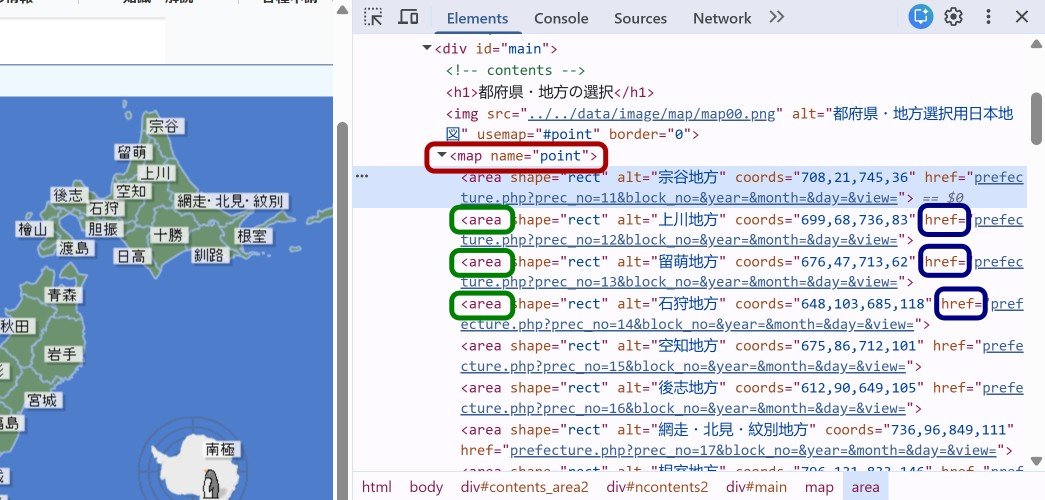
href link to each region is associated with <area> tags, which are all contained under the <map> tag.
We can use this information to retrieve the URL links to each region using Beautiful Soup’s .find() and .find_all() methods. Specifically, we can make a list of all <area> tag elements nested inside the <map> tag with the following line of code:
# Take out just the <area> tags, nested within the <map> tag
areas_japan_map = soup_japan_map.find('map').find_all('area')
A simple check of the first three elements in the resulting list shows that the <area> tag with its corresponding attributes are all successfully extracted.
# Check that the extracted HTML contains the data we want
for i in range(0, 3):
    print(areas_japan_map[i])

# Type of each element in the resulting list
print('Type: ', type(areas_japan_map[0]))
<area alt="宗谷地方" coords="708,21,745,36" href="prefecture.php?prec_no=11&block_no=&year=&month=&day=&view=" shape="rect"/>
<area alt="上川地方" coords="699,68,736,83" href="prefecture.php?prec_no=12&block_no=&year=&month=&day=&view=" shape="rect"/>
<area alt="留萌地方" coords="676,47,713,62" href="prefecture.php?prec_no=13&block_no=&year=&month=&day=&view=" shape="rect"/>
Type: <class 'bs4.element.Tag'>Since the list contains a Tag object defined by the Beautiful Soup library (as indicated by the bs4.element.Tag class above), we can use the tag.get('attr') method to extract attributes inside the tag.
Let’s test this method out on one <area> tag object from the list to extract the href attribute.
# Testing extraction of attribute from tag
test_area_tag = areas_japan_map[0]
href_test = test_area_tag.get('href')
print('Extracted href:\t', href_test)
Extracted href: prefecture.php?prec_no=11&block_no=&year=&month=&day=&view=We see that the extracted link to the smaller region (Figure 2) is a relative path and not a complete URL. We will not be able to use the requests.get() function on this relative link. Thus, we’ll need to add the first part of the URL to make it complete:
href = 'https://www.data.jma.go.jp/stats/etrn/select/' + hrefWe’ll iterate through the list of tags for each region, and store the complete regional map URLs in a list to send HTTP requests later on.
# Empty list to store all the regional URLs
jma_regional_url_list = []

# Work through the list of area tags to extract the href links
for area_tag in areas_japan_map:
    href = area_tag.get('href')

    # Add on the base URL to get a full URL
    href = 'https://www.data.jma.go.jp/stats/etrn/select/' + href

    # Add the full URL to the list
    jma_regional_url_list.append(href)
We confirm that 61 complete URLs that (hopefully) lead to the regional map interfaces (Figure 2) have been extracted from the starting map URL.
# Check the full URLs extracted
for i in range(0, 3):
    print(jma_regional_url_list[i])

# Check how many area URLs we have
print('Number of area links: ', len(jma_regional_url_list))
https://www.data.jma.go.jp/stats/etrn/select/prefecture.php?prec_no=11&block_no=&year=&month=&day=&view=
https://www.data.jma.go.jp/stats/etrn/select/prefecture.php?prec_no=12&block_no=&year=&month=&day=&view=
https://www.data.jma.go.jp/stats/etrn/select/prefecture.php?prec_no=13&block_no=&year=&month=&day=&view=
Number of area links: 61Now that we have the complete URLs to all 61 regions, we can access each regional map interface, and extract the attributes associated with individual weather stations.
3.2 Extract Relevant Attributes of Weather Stations from the Regional Map
Similar to the steps above for extracting href relative paths to each regional map, we’ll scrape the HTML associated with the links to each meteorological station. Namely:
- Scrape the HTML inside the regional map using
requests.get() - Parse the HTML in the regional map using
BeautifulSoup()
# Testing with just the first regional map URL
testURL = jma_regional_url_list[0]

# Scrape and initial parsing
response_test = requests.get(testURL)
soup_test = BeautifulSoup(response_test.content, 'html.parser')

# Sleep between requests
time.sleep(30)
Next, we identify the location of the unique JMA station identifiers from the regional map HTML. Figure 4 shows the map interface from Figure 2 and its HTML code (right click on web page and select “Inspect”). The links to each meteorological station are, once again, inside the <area> tags (green) which are nested inside the <map> tag (red). The partial URL for the weather station is stored as href attributes (blue).
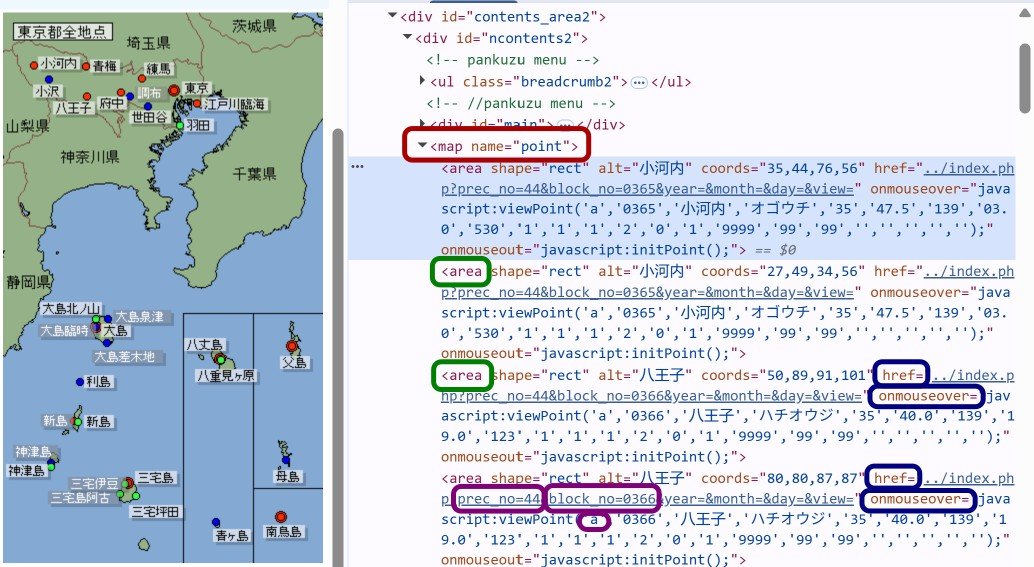
href and onmouseover attributes (blue) inside the <area> tags (green), which are all contained under the <map> tag (red).
While all three identifiers for each meteorological station (indicated in purple in Figure 4) are contained inside the <area> tag, they are not all part of the partial URL inside the href attribute. Specifically, whether the station is an s or an a type is stored inside the onmouseover attribute (also in blue).
As such, we’ll need to extract the following from each <area> tag inside the <map> tag:
hrefattribute to obtainprec_noandblock_noonmouseoverattribute to obtainaorsaltattribute for the station name in Japanese
Let’s test this out on one JMA station:
# Extract the <area> tags nested inside the <map> tag
areas_test = soup_test.find('map').find_all('area')

# Regular expressions to search out prec_no, block_no and whether the station is a or s type
re_prec_block = r'prec_no=(\d+)&block_no=(\d+)'
re_a_s = r'javascript:viewPoint\(\'(.)'

# Choose just one weather station to test
one_test_station = areas_test[0]

# The weather station name (in Japanese) is stored as the `alt` attribute
station_name = one_test_station.get('alt')

# `href` attribute for JMA station containing prec_no and block_no and the `onmouseover` containing a vs s
href = one_test_station.get('href')
onmouseover = one_test_station.get('onmouseover')

# We can get prec_no and block_no from the href
test_match_href = re.search(re_prec_block, href)
prec_no = test_match_href[1]
block_no = test_match_href[2]

# Whether the station is an a or s type from onmouseover
test_match_onmouse = re.search(re_a_s, onmouseover)
a_s = test_match_onmouse[1]

# Print out results of parsing
print(f'Station: {station_name}, \tprec_no: {prec_no}, \tblock_no: {block_no}, \ta or s: {a_s}')
Station: 稚内, prec_no: 11, block_no: 47401, a or s: sWe’ve extracted the prec_no, block_no and that the 稚内 (Wakkanai) weather station is of type s.
3.2.1 Check Extracted Identifiers Against Actual URL
Let’s check the extracted identifiers against the actual URL of the Wakkanai weather station. The weather station is included in the jma_URLs_comp dictionary from before, a list of the full URLs to access the 10-minute interval weather data from March 9, 2024.
# Compare the results of the extraction to the actual URL from the weather station
wakkanai_URL = jma_URLs_comp['wakkanai']

# Find the part that matches the template URL
URL_match = re.search(re_URL, wakkanai_URL)

# The regex extracts three sections that differ in the URL. Print them out with different colors
print(f"{'wakkanai'.capitalize():<12}", end='')
print('data.jma.go.jp/stats/etrn/view/10min_', end="")
print(f"\033[1;31m{URL_match.string[URL_match.start(1):URL_match.end(1)]}\033[0m", end="")
print('1.php?prec_no=', end="")
print(f"\033[1;32m{URL_match.string[URL_match.start(2):URL_match.end(2)]}\033[0m", end="")
print('&block_no=', end="")
print(f"\033[1;34m{URL_match.string[URL_match.start(3):URL_match.end(3)]}\033[0m", end="")
print('&year=2024&month=3&day=9&view=')
Wakkanai data.jma.go.jp/stats/etrn/view/10min_s1.php?prec_no=11&block_no=47401&year=2024&month=3&day=9&view=
Indeed, the results confirm that the extraction was successful. The 稚内 (Wakkanai) weather station has:
prec_noof 11block_noof 47401- Is of type
s
We can store this information in a nested dictionary:
# Storing the results of the extraction into a dictionary
test_dict = {}
test_dict[station_name] = {'prec_no': prec_no, 'block_no': block_no, 'a or s': a_s}

# Print out dictionary to check
print(test_dict)
{'稚内': {'prec_no': '11', 'block_no': '47401', 'a or s': 's'}}This allows us to construct any desired URL of the Wakkanai JMA weather station, given that we know the parts of the URL that designate the date, and the data format. If you already know the specific URL template that you want to apply the station identifiers to, you may go ahead make the complete URL and save it inside the dictionary as well.
But now, we want to know the identifiers for all weather stations. Let’s go ahead and generalize the code to extract all stations from the same region, then move onto different regions in the starting map interface.
3.3 Extract the Identifiers of All Stations Within the Region
Recall the HTML structure of the regional maps (Figure 4). We’ve already scraped the HTML and did some initial parsing, and extracted the <area> tag objects as a list during initial testing:
# Extract the <area> tags nested inside the <map> tag
areas_test = soup_test.find('map').find_all('area')
By looping through the <area> tags inside the areas_test list, we will be processing through each JMA station within this region. Here, we can obtain the station name, its prec_no, its block_no and whether it is an a or s type station. The results will be saved in a nested dictionary as before.
# Work through each weather station inside the region
for area_now in areas_test:
    # JMA station name
    station_name = area_now.get('alt')

    # Skip if the station name already exists in dictionary
    if station_name in test_dict:
        continue

    # Get the href attribute
    href = area_now.get('href')

    # We can get prec_no and block_no from the URL
    test_match_URL = re.search(re_prec_block, href)

    # If we have no URL match
    if test_match_URL == None:
        print('No URL match: ', station_name)
        continue

    # Prec and block numbers
    prec_no = test_match_URL[1]
    block_no = test_match_URL[2]

    # Find the `onmouseover`` attribute
    onmouseover = area_now.get('onmouseover')

    # In case we have no match
    if onmouseover == None:
        print('No onmouseover match: ', station_name)
        a_s = 'neither'
    else:
        test_match_onmouse = re.search(re_a_s, onmouseover)

        # Whether the station is a or s
        a_s = test_match_onmouse[1]

    # Assign this to a nested dictionary
    test_dict[station_name] = {'prec_no': prec_no, 'block_no': block_no, 'a or s': a_s}

print('')
# Print dictionary to check its contents
for key, val in test_dict.items():
    print(f'{val}\tstation: {key}')
No onmouseover match: 宗谷地方全地点
No URL match: 留萌地方
No URL match: 上川地方
No URL match: 網走・北見・紋別地方
{'prec_no': '11', 'block_no': '47401', 'a or s': 's'} station: 稚内
{'prec_no': '11', 'block_no': '0002', 'a or s': 'a'} station: 沓形
{'prec_no': '11', 'block_no': '0003', 'a or s': 'a'} station: 浜頓別
{'prec_no': '11', 'block_no': '47402', 'a or s': 's'} station: 北見枝幸
{'prec_no': '11', 'block_no': '0005', 'a or s': 'a'} station: 歌登
{'prec_no': '11', 'block_no': '1051', 'a or s': 'a'} station: 中頓別
{'prec_no': '11', 'block_no': '1054', 'a or s': 'a'} station: 豊富
{'prec_no': '11', 'block_no': '1203', 'a or s': 'a'} station: 沼川
{'prec_no': '11', 'block_no': '1207', 'a or s': 'a'} station: 船泊
{'prec_no': '11', 'block_no': '1284', 'a or s': 'a'} station: 宗谷岬
{'prec_no': '11', 'block_no': '1285', 'a or s': 'a'} station: 浜鬼志別
{'prec_no': '11', 'block_no': '1512', 'a or s': 'a'} station: 本泊
{'prec_no': '11', 'block_no': '1528', 'a or s': 'a'} station: 声問
{'prec_no': '11', 'block_no': '1546', 'a or s': 'a'} station: 礼文
{'prec_no': '11', 'block_no': '1593', 'a or s': 'a'} station: 幌泊
{'prec_no': '11', 'block_no': '00', 'a or s': 'neither'} station: 宗谷地方全地点
{'prec_no': '11', 'block_no': '1573', 'a or s': 'a'} station: 幌延
{'prec_no': '11', 'block_no': '1656', 'a or s': 'a'} station: 礼文上泊埼You’ll notice I’ve included an additional if statement of if station_name in test_dict: to skip over duplicate entries of each JMA station in the regional map HTML, as seen in Figure 4. The duplicate entries enable the user to click either the station name or the dot marker on the map interface, to select the weather station. As they both contain the same HTML information, we can skip ahead to the next <area> tag element, or JMA weather station, if it already exists in the python dictionary.
I have also included code to catch two cases where we have no matches to the regular expression for href and when we have no onmouseover attribute. I’ll briefly explain each of these cases below.
3.3.1 When No Regex Match for the href is Found
The code block:
# We can get prec_no and block_no from the URL
test_match_URL = re.search(re_prec_block, href)

# If we have no URL match
if test_match_URL == None:
    print('No URL match: ', station_name)
    continue
tests for the case where we have no matches with the href regular expression to re_prec_block = r'prec_no=(\d+)&block_no=(\d+)'. In other words, the href attribute inside the <area> tag contains no prec_no or block_no.
Such is the case with the stations named 留萌地方 (Rumoi region), 上川地方 (Kamikawa region), and 網走・北見・紋別地方 (Abashiri, Kitami, Monbetsu regions). Here’s a copy of the relevant printed outputs from running the code above:
No URL match:  留萌地方
No URL match:  上川地方
No URL match:  網走・北見・紋別地方
This is because these three “stations” are not stations at all. They are neighbouring regions in the map, which are also clickable on the region map interface(Figure 2). In other words, these <area> tags contain an href attribute, but the URL links follows the format of URLs of regional maps. Thus, they do not contain prec_no or block_no associated with individual weather stations.
Since these regions are not weather stations, they do not need to be extracted or included in the final dictionary. They were simply skipped with the continue command.
3.3.2 When No onmouseover Attribute is Found
The code block:
# Find the `onmouseover` attribute
onmouseover = area_now.get('onmouseover')

# In case we have no match
if onmouseover == None:
    print('No onmouseover match: ', station_name)
    a_s = 'neither'
tests for the case where the <area> tag contains no onmouseover attribute. Such is the case with 宗谷地方全地点 (All points in the Souya region).
No onmouseover match: 宗谷地方全地点Again, this tag element is not a specific JMA weather station. It is also not a neighbouring region on the map. This <area> tag is associated with the current region.
I’ve set up the code so that it stores this item in the final dictionary, which shows up as:
宗谷地方全地点 {'prec_no': '11', 'block_no': '00', 'a or s': 'neither'}This asserts that the prec_no identifies the region. Indeed, the weather stations that we’ve extracted all seem to have the same prec_no of 11.
Now that we can extract the identifiers of one given region, let us generalize the code for all regions in the starting map interface (Figure 1).
3.4 Generalize to All Regions in the Starting Map Interface
We’d like to expand the code above by iterating through all the regional map interface URLs. However, before we go ahead with the code, we’ll take some extra steps to prevent our code from running needlessly.
Specifically, if we were to scrape the JMA weather station identifiers while accessing over 60 regional map URLs, we’d like to be a responsible data scraper and pause between requests. If we were to arbitrarily wait 30 seconds between HTTP get requests for 60 different URLs, the code will need at least 30 minutes to finish running.
As such, we will use pathlib.Path() method to check if the JSON file containing the final dictionary already exists, and only run the whole code if the file does not yet exist.
# Libraries to save the dictionary as a json, and check if the file exists
import json
from pathlib import Path
# File path to save the final dictionary
fileName = './data/amedas_prec_block_no_dict.json'
# Check if the file exists
#print(f"Python is currently looking here: {Path(fileName).resolve()}")
if Path(fileName).exists():
print("JSON file containing final nested dictionary already exists. \nSkip the algorithmic site crawling process. \nDelete `amedas_prec_block_no_dict.json` file in data subfolder if you would like to run the web crawling process.")
# Open and load the JSON file containing the
with open(fileName, 'r', encoding='utf-8') as file:
prec_block_as_dict = json.load(file)
else:
print('Starting algorithmic web crawling for URL identifier discovery')
# Final nested dictionary
prec_block_as_dict = {}
# Regular expressions for finding prec_no, block_no and a vs s
re_prec_block = r'prec_no=(\d+)&block_no=(\d+)'
re_a_s = r'javascript:viewPoint\(\'(.)'
# For each regional map URL
for i, url_now in enumerate(jma_regional_url_list):
# Print current region number for every 10th region
if (i + 1) % 10 == 1:
print(f'\tRegion {i+1} out of {len(jma_regional_url_list)}')
# Scrape and initial parsing of the regional map
response = requests.get(url_now)
soup = BeautifulSoup(response.content, 'html.parser')
# Extract the <area> tags for each JMA station nested under the <map> tag
stations_in_region = soup.find('map').find_all('area')
# Work through each weather station inside the region
for station_now in stations_in_region:
# The weather station name (in Japanese) is stored as the `alt` attribute
station_name = station_now.get('alt')
# `href`` attribute for JMA station containing prec_no and block_no and the `onmouseover` containing a vs s
href = station_now.get('href')
onmouseover = station_now.get('onmouseover')
# We can get prec_no and block_no from the href
match_href = re.search(re_prec_block, href)
# If we have no URL match
if match_href == None:
#print('No URL match: ', station_name)
continue
# Prec and block numbers
prec_no = match_href[1]
block_no = match_href[2]
# In case we have no onmouseover attribute
if onmouseover == None:
#print('No onmouseover match: ', station_name)
a_s = 'neither'
else:
# Find the regular expression for a vs s
match_onmouse = re.search(re_a_s, onmouseover)
# Whether the station is a or s
a_s = match_onmouse[1]
# Assign this to a nested dictionary
prec_block_as_dict[station_name] = {'prec_no': prec_no, 'block_no': block_no, 'a or s': a_s}
# Sleep between requests
time.sleep(30)
# Write dictionary to a JSON file
with open(fileName, "w", encoding='utf-8') as file:
json.dump(prec_block_as_dict, file, indent=4, ensure_ascii=False) # indent=4 makes it pretty and human-readableStarting algorithmic web crawling for URL identifier discovery
Region 1 out of 61
Region 11 out of 61
Region 21 out of 61
Region 31 out of 61
Region 41 out of 61
Region 51 out of 61
Region 61 out of 61The algorithmic web crawling code, and the subsequent json.dump() method to save the nested dictionary, will only run if the JSON file does not exist.
Finally, let’s check some of the entries of the saved dictionary.
# Check some of the dictionary contents
count = 0
for key, value in prec_block_as_dict.items():
    if count % 100 == 0:
        print(f'{value}\tstation: {key}')
    count += 1
{'prec_no': '11', 'block_no': '47401', 'a or s': 's'} station: 稚内
{'prec_no': '81', 'block_no': '0773', 'a or s': 'a'} station: 桜山
{'prec_no': '20', 'block_no': '0109', 'a or s': 'a'} station: 足寄
{'prec_no': '31', 'block_no': '0160', 'a or s': 'a'} station: 蟹田
{'prec_no': '33', 'block_no': '47585', 'a or s': 's'} station: 宮古
{'prec_no': '35', 'block_no': '0275', 'a or s': 'a'} station: 長井
{'prec_no': '40', 'block_no': '1331', 'a or s': 'a'} station: 常陸大宮
{'prec_no': '44', 'block_no': '1643', 'a or s': 'a'} station: 大島泉津
{'prec_no': '49', 'block_no': '47638', 'a or s': 's'} station: 甲府
{'prec_no': '52', 'block_no': '1057', 'a or s': 'a'} station: 美濃
{'prec_no': '54', 'block_no': '1469', 'a or s': 'a'} station: 松浜
{'prec_no': '61', 'block_no': '1383', 'a or s': 'a'} station: 三和
{'prec_no': '66', 'block_no': '47756', 'a or s': 's'} station: 津山
{'prec_no': '69', 'block_no': '0713', 'a or s': 'a'} station: 倉吉
{'prec_no': '81', 'block_no': '0779', 'a or s': 'a'} station: 安下庄
{'prec_no': '85', 'block_no': '1075', 'a or s': 'a'} station: 伊万里
{'prec_no': '88', 'block_no': '0895', 'a or s': 'a'} station: 内之浦We’ve extracted the three unique identifiers for each JMA weather station and save the nested dictionary as a JSON file. The file can now be loaded into any workspace where we’d like to scrape weather data of a particular date or format.
4 Summary
That’s it! We’ve algorithmically crawled the JMA website, automatically discovering and extracting the unique identifiers associated with the URLs of each weather station. A reminder of what we’ve learned in this tutorial:
- Collected
hrefattributes to generate complete URLs to each regional map (Figure 2) from the starting JMA map interface (Figure 1) usingrequestsandBeautiful Souplibraries - Scraped and parsed
hrefandonmouseoverattributes from the regional JMA maps (Figure 4) - Used regular expressions (regex) and extracted identifiers unique to each JMA weather station and stored them as nested dictionaries
- Saved the nested dictionary as a JSON file
- Ensured that the code doesn’t run if the file already exists
If you are also scraping multiple web pages whose unique identifiers are accessible from one starting URL, you too may be able to algorithmically crawl the website to automatically discovery the URLs you want to scrape data from.
5 Further Readings
- Look up the three unique identifiers for each JMA weather station quickly on my interactive and informative map of all AMeDAS weather stations in Japan
- New to data scraping? Here’s my blog post on responsible web scraping practices
- Never scraped data from the web before? Learn how to scrape and parse 10-minute interval weather data from the Japan Meteorological Agency’s website in this step-by-step tutorial
- Learn how to draw up hundreds of scatter plot-like circle markers on
foliummaps